

Best WordPress Architecture for Scalability: How to Build a Site That Grows With You
Most businesses don’t think seriously about WordPress architecture until something breaks — until the site crashes during a product launch, the database times out under a traffic spike, or a Friday afternoon plugin update turns the homepage into a white screen.
That reactive approach is expensive in emergency developer rates, lost revenue, and accumulated technical debt. The smarter move is to architect your WordPress site for the traffic and complexity you’re growing toward — not just the traffic you have today.
1. The Right Hosting Foundation
Shared hosting is fine for a personal blog. It is not acceptable for a growing business. A scalable WordPress site starts with managed WordPress hosting or a properly configured cloud VPS that provides:
- PHP 8.1+ for performance improvements and active security support
- MySQL 8.0 or MariaDB for faster query execution
- Server-level caching (LiteSpeed, Nginx FastCGI, or equivalent)
- Fully isolated resources — your site’s performance should be independent of other accounts
- Automated daily backups with off-site storage
- Staging environments for testing changes before they touch production
Managed hosts like Kinsta, WP Engine, Cloudways, and Rocket.net are purpose-built for WordPress at scale. The cost premium over shared hosting pays for itself the first time a traffic surge doesn’t take you offline.
2. Layered Caching Strategy
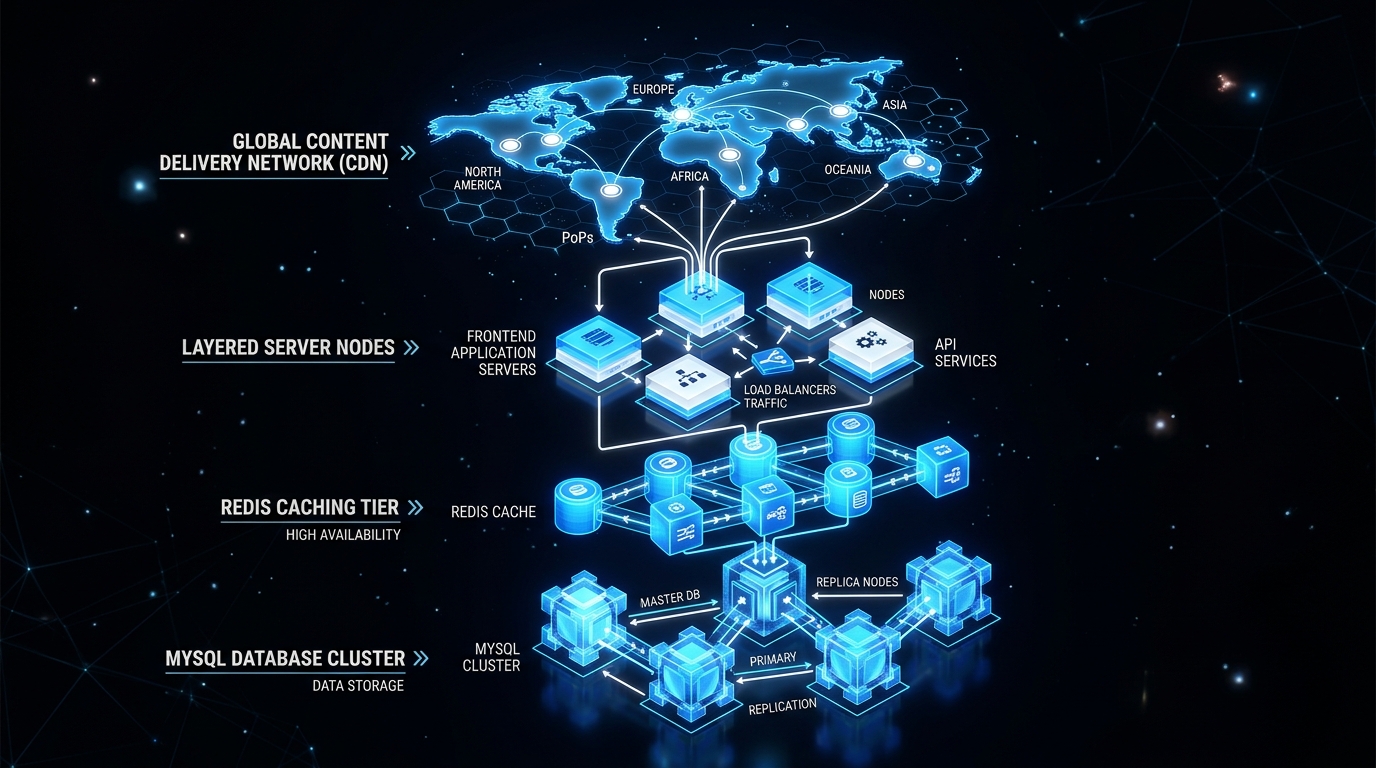
Caching is the single highest-impact optimization available to WordPress sites. A complete caching setup operates at four levels simultaneously:
- Page Cache: Stores fully rendered HTML so WordPress doesn’t regenerate pages for every visitor. Tools: WP Rocket, LiteSpeed Cache.
- Object Cache: Stores database query results in memory (Redis or Memcached), dramatically reducing database load on dynamic pages.
- Browser Cache: Instructs visitors’ browsers to store static assets locally for near-instant repeat visits.
- Opcode Cache: PHP-level caching via OPcache that eliminates repeated PHP compilation overhead.
3. Database Optimization
WordPress databases accumulate noise silently over time — post revisions, expired transients, orphaned metadata, spam comment rows. Left unmanaged, query times slow and everything dependent on the database slows with it. A scalable architecture addresses this from the start:
- Limit post revisions:
define('WP_POST_REVISIONS', 5);in wp-config.php - Schedule regular database cleanup (WP-Optimize or WP-CLI scripts)
- Add proper indexes to any custom database tables
- Use read replicas for high-traffic sites to separate read and write operations
- Monitor slow queries with Query Monitor or the MySQL slow query log
4. CDN and Asset Delivery
A CDN distributes static assets — images, CSS, JavaScript, fonts — across globally distributed servers. Visitors are served from the nearest node, not from an origin server that may be thousands of miles away. Cloudflare is the gold standard for WordPress: its free tier is genuinely excellent, its paid plans add image optimization and advanced cache rules.
Beyond CDN, asset delivery optimization includes:
- Serving images in WebP or AVIF format (30–70% smaller at equivalent quality)
- Responsive image srcsets so devices only download appropriately sized images
- Lazy loading for all below-the-fold images and iframes
- Self-hosting fonts to eliminate external DNS lookup penalties
5. Clean Code Architecture
Template-based sites accumulate technical debt. Every plugin adds queries, HTTP requests, and JavaScript to every page — whether that page needs them. A custom-built WordPress site includes only what it needs, structured for extensibility:
- Minimal plugin footprint: Every active plugin is a performance and security liability. Build functionality into the theme or a purpose-built plugin where possible.
- Conditional asset loading: Enqueue scripts and styles only on the pages that actually use them — not globally across the entire site.
- Environment configuration: Credentials, API keys, and environment-specific settings in constants or .env files — never hardcoded in theme files.
- Custom post types: Model your content correctly rather than forcing everything into posts and categories.
6. Monitoring and Failsafes
A scalable architecture isn’t one that never fails — it’s one that detects problems fast and recovers cleanly:
- Uptime monitoring: UptimeRobot or Better Uptime — 60-second check intervals with instant alerts
- Performance monitoring: New Relic or Query Monitor for PHP-level regressions over time
- Error logging: WP_DEBUG_LOG feeding into Sentry for real-time fatal error alerts
- Automated backups: Daily encrypted backups to off-site cloud storage — not just your host’s backup
Our website maintenance care plans include all of the above as standard — because architecture that isn’t monitored deteriorates quietly until something breaks loudly.

Comments